Train Dispatcher
The Train Dispatcher is the central traffic controller of your layout. It hands out clearances (exclusive permissions to use a specific path) so that two trains never claim overlapping track at the same time.
Think of it like a real signalman: before a train enters a section, it asks the dispatcher for a clearance. The dispatcher only grants it if no other train is already using any of the layout items on the requested path. Once the train arrives, the clearance is cancelled and the path becomes available again.
How it works
A clearance is built from three things:
- The path: the sequence of layout items the train wants to drive over.
- An owner: a free-form label identifying who asked for it (a script's name, or "User" for manual moves).
- A unique id: used internally to release the clearance later.
When you request a clearance, the dispatcher checks whether any layout item on the requested path is already covered by another active clearance. If there is no overlap, it returns a clearance id and the request succeeds. If there is overlap, the request is denied and waits (as soon as another clearance is cancelled, the dispatcher tries again automatically).
This means scripts that ask the dispatcher for a path block until they get it. You don't have to write retry logic yourself.
INFO
The Train Dispatcher is a coordination layer, not a hardware safeguard. The protection comes from the discipline of every script and every manual move requesting a clearance before driving. It doesn't watch feedback sensors, and it can't stop a train it wasn't told about. A script that drives without first asking for a clearance can roll right over track another train holds. Treat Request clearance as part of the protocol every train follows on shared track.
Manual moves
In the throttle view's navigation mode, the Via dispatcher toggle controls whether your manually selected paths go through the dispatcher.
- When on (default), tapping GO asks the dispatcher for a clearance, sets the turnouts, and shows a notification when the clearance is granted. The clearance stays active until you cancel it from the clearance bar that appears at the bottom.
- When off, GO sets the turnouts directly without involving the dispatcher (useful when you're the only one driving).
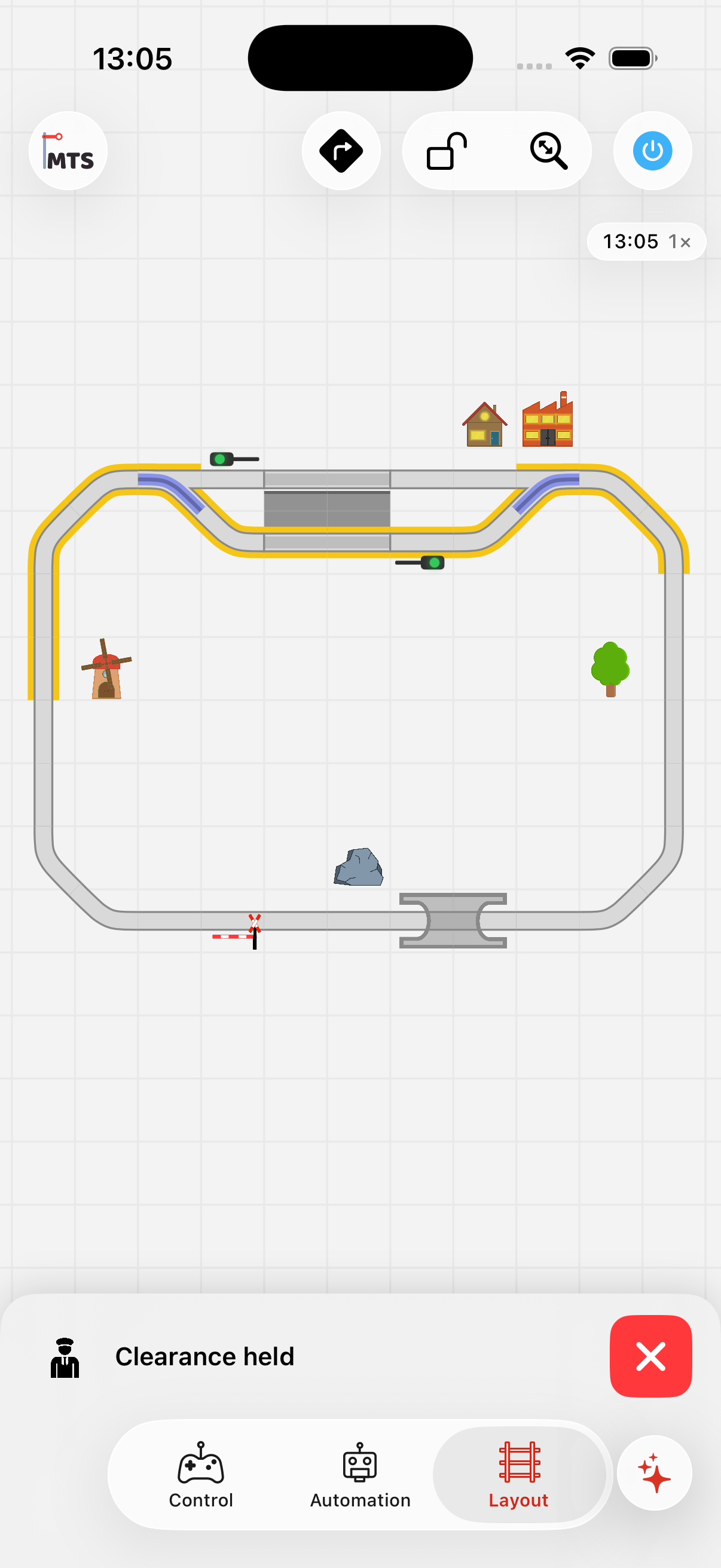
A manually-held clearance: cleared track is highlighted yellow and the clearance bar at the bottom lets you release it.
Scripted moves
Two automation actions let scripts work with the dispatcher: Request clearance and Release clearance. By default a script holds at most one clearance at a time, automatically associated with the running script.
For more advanced cases — a single script holding several clearances at once, or one script releasing another script's clearance — attach an optional clearance name to the clearance when requesting it, and use the same name on the matching release. See the Request clearance action for details. Most scripts won't need this.
Example: a single-track shuttle
Two locos share a single-track segment between stations A and B. Each loco runs its own script. Whichever script asks first gets the clearance; the other waits in Request clearance until the first script's Release clearance runs.
Group: Drive A → B
  Action: Request clearance     (from A to B)
  Action: Set vehicle speed     (50%)
  Action: Wait for feedback     (arrived at B)
  Action: Stop vehicle
  Action: Release clearance
The same script structure is used in both directions. Because the dispatcher arbitrates the shared segment, you don't need flags, variables, or hand-rolled coordination. The request simply blocks the second train until the first releases its clearance.
Visualising active clearances
Active clearances are drawn on the throttle layout in yellow. Items not currently covered by any clearance keep their normal appearance.
The full list of active clearances (together with their owners) is shown in the Clearances section of the automation tab. Each row has a cancel button so you can release a clearance manually if a script is stuck or if you want to recover from a misconfiguration.